
QS-9500 RFQs: Separate Highlighters and Board Pens
QS-9500 appears on two different Jinsida product pages: one under Highlighters and another under Whiteboard Markers. For an RFQ, include the exact page URL, category and intended application, then ask the supplier for a distinct item reference. The shared model text and size do not identify which product is requested.
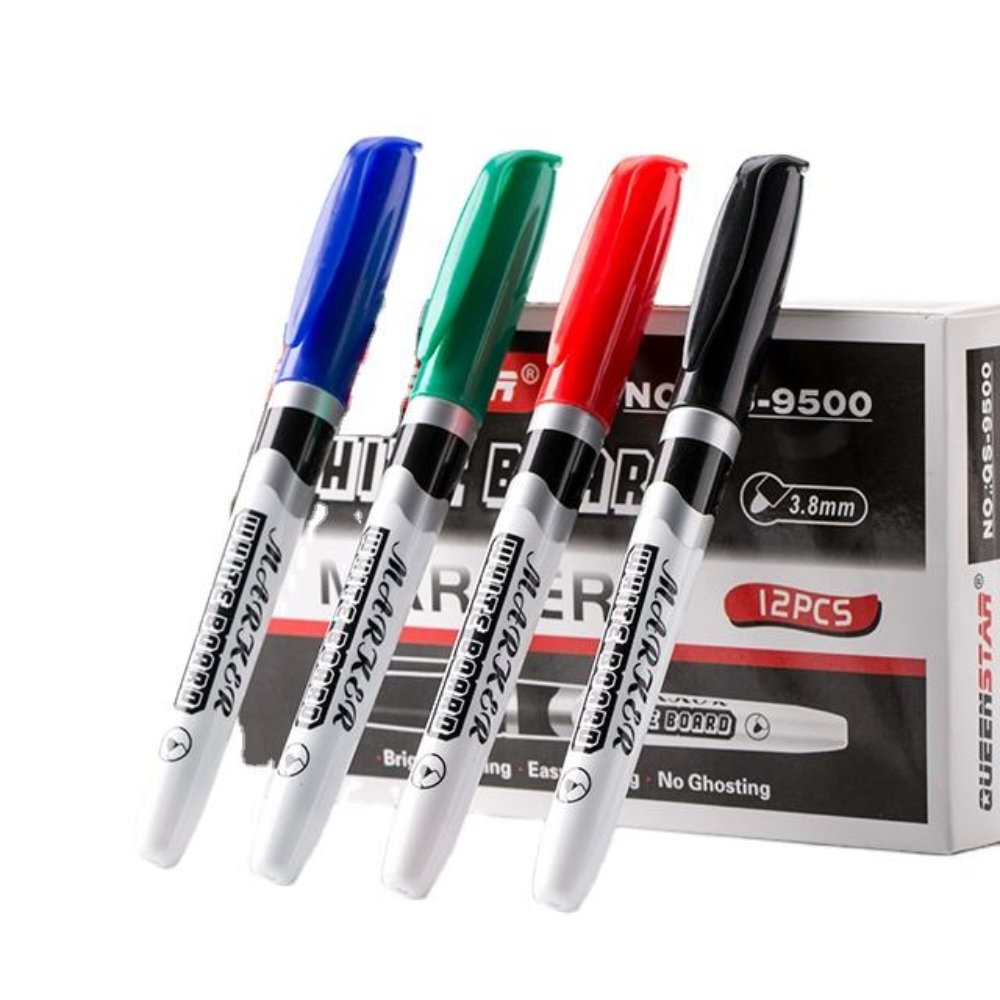
The Whiteboard Markers page supplies this QS-9500 reference. Box markings identify the pictured presentation; they are not approval of pack contents, safety claims or writing results.
The model text appears in two categories
A request for QS-9500 can identify two different catalogue pages. Jinsida Stationery lists QS-9500 under Highlighters and QS-9500 under Whiteboard Markers. The pages describe different applications and colour ranges. A buyer sourcing wholesale whiteboard markers should therefore send more than the shared model text.
Include the category, exact product URL and intended application in the enquiry. Ask the supplier to identify which actual item the quotation covers. This is especially useful when a catalogue export, email subject or purchasing system keeps the short model field but drops the category or product link.
Compare the page fields without merging them
The inspected pages share some published fields and differ in others. Keep the entries attached to their respective URLs. The table records supplier-published information for identification; it does not report independent measurements or confirm ink performance.
Published field
Highlighters page
Whiteboard Markers page
Model text
QS-9500
QS-9500
Listed colour range
Yellow, orange, pink, purple, sky blue, apple green
Black, red, blue, green
Dimensions
140 × 12 mm
140 × 12 mm
Weight
8.35 g
8.7 g
Ink weight
1.8 g
1.8 g
The identical size and ink-weight entries are particularly important: neither field distinguishes the two requested products. Do not combine the highlighter colour range with the whiteboard description and call the result one complete specification. Retain each page as a separate source record.
A different QS-9500 page is categorised as Highlighters and supplies this six-colour reference. The shared model text does not make it the whiteboard product.
Name the intended application in plain language
The Highlighters page describes note highlighting and journal decoration. The Whiteboard Markers page describes board meetings, classroom teaching and notice-board applications. In the enquiry, state what the buyer is selecting rather than relying on the supplier to infer the intended category from a colour word or an attached image.
For a whiteboard request, identify the board-related product page and explain the intended review context. For a highlighter request, identify the separate highlighter page. Keep any required paper or board evaluation as its own task. A correct catalogue identity is the starting point for that review, not evidence that the product has passed it.
Retain the exact selected product URL.
Keep the page category beside QS-9500.
State the intended application and selected colour reference.
Request the supplier’s item identity for that proposal.
Ask for distinct supplier item references
If the buyer wants both product types, use two quotation lines and ask how the supplier distinguishes them internally. Retain the supplier’s actual reference next to the buyer’s own stock description. Do not invent a manufacturer suffix or assume that the website’s URL ending is a printed supplier item code.
Attach the relevant gallery reference to each line. The visual differences help a reviewer notice when a response appears to address the other product, but the written category and supplier confirmation remain important. If the supplier proposes an alternative, request its own complete identity instead of accepting a reply that repeats only QS-9500.
Another view from the Whiteboard Markers listing. Visible tip and drawn-line graphics remain catalogue references, not an independently completed board-performance test.
Keep samples and artwork tied to the chosen page
When requesting a sample, repeat the category, URL and confirmed supplier item reference. Keep the sample label with the received pen and record which quotation line it answers. This prevents a later reviewer from treating any QS-9500-labelled sample as the requested whiteboard or highlighter version.
Use the same identity when discussing barrel or packing artwork. A catalogue box can show a pack count or product wording, but it does not define every offered assortment or approve claims for the buyer’s label. Resolve those fields for the selected product after the basic item identity is clear.
Preserve the distinction on repeat orders
Retain the confirmed mapping between product page, category, supplier reference and sample. A future order should cite that mapping rather than copying the short model name from an old email. If the catalogue or supplier proposal changes, compare the affected fields before replacing the accepted reference.
This approach keeps two legitimate catalogue entries separate without guessing why they share a model name. It also prevents shared dimensions from being mistaken for interchangeability. Send the selected page and intended application through the Jinsida contact page when asking the supplier to confirm the actual quoted item.
QS-9500 identification questions
Is QS-9500 alone enough for an RFQ?
The inspected site uses that text on two product pages. Include category and exact URL, and obtain the supplier’s identity for the proposal.
Do matching dimensions mean the same ink product?
No such conclusion follows from the shared size entry. Keep each page’s category and description separate and ask for the actual selected item.
Should both types share one purchasing line?
Use separate lines when requesting both. Each should retain its category, product URL and supplier-confirmed reference so samples and later orders remain identifiable.
QS-9500Product IdentityWhiteboard Marker RFQ